

Suede.ai
How Suede AI sells music generation to agents through Skyfire.
Suede AI is an agentic platform company that builds music and creator software. Its paid generation services run on x402, a payment protocol in which each request is paid in USDC on Base and signed by the caller's own wallet.
To expand its buyer reach, Suede added KYAPay as an additional payment rail. Now any agent connected to Skyfire, including chat clients that use the Skyfire MCP server, can find, pay for, and call Suede's services.
Suede's seller services
A seller service is a listing on the Skyfire Directory that offers a resource (i.e. MCP server, API, webpage, or Fetch.ai agent) in exchange for a KYAPay token. Once a service is published, agents can find it in the directory and pay to use it, with no account setup or billing arrangement required. To learn more, see Seller Services, or follow the Seller Guide to get started as a seller.
Suede onboarded as a Skyfire seller, configured its backend to accept and validate KYAPay tokens, then published three of its APIs to the Skyfire Directory as seller services.
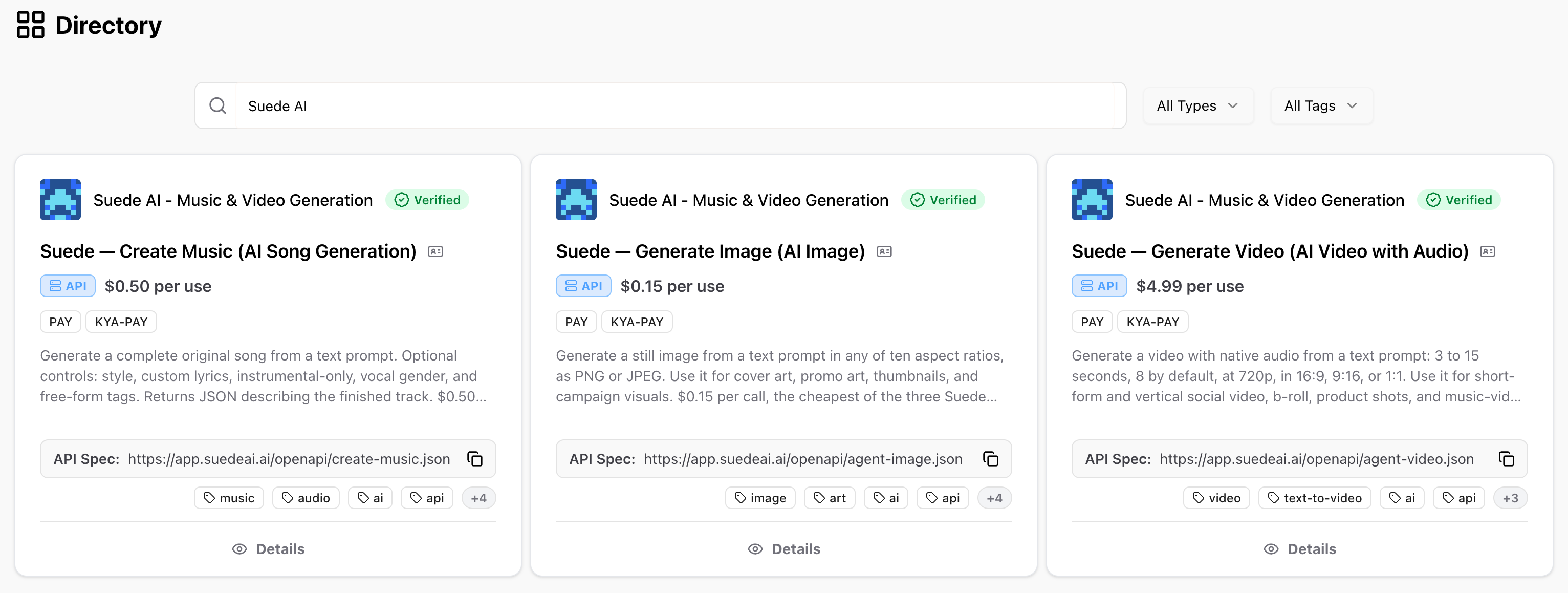
Visit the Skyfire Directory yourself to see the live Suede AI services.
Accessing Suede's services
Buying from a seller service requires little overhead, and anyone can do it. Through a chat client connected to the Skyfire MCP server, users can access Suede's services by asking for what they want in plain language. The agent finds the service, pays for it, and returns the result, without the user writing code or managing payments.
The same purchase can also be made through direct API calls. That method is shown first, because it makes each step of the transaction visible. The chat client method follows it.
The direct API walkthrough and the chat client walkthrough both purchase from Suede's Create Music service. The buyer describes a song in a text prompt, such as its genre, mood, and instruments, and can optionally supply lyrics or ask for an instrumental track. The service returns a finished, full-length MP3 with vocals and arrangement. Each call costs $0.50.
Via direct API calls
To use Create Music without a chat client, a developer configures two requests. First, call the Create Token API with Create Music's seller service ID and listed price to receive a KYAPay token. Second, call Suede's API, passing that token in a header to receive the generated song.
This approach suits developers who are building a specific integration with Suede into their own agent. The requests and responses below are from a real purchase of Create Music.
Step 1: Create a token
Request a pay (or kya-pay) token for Create Music. Set tokenAmount to the service's listed price, and authenticate with your Skyfire API key.
curl -X POST 'https://api.skyfire.xyz/api/v1/tokens' \
  -H 'skyfire-api-key: <YOUR_SKYFIRE_API_KEY>' \
  -H 'Content-Type: application/json' \
  -d '{
    "type": "pay",
    "tokenAmount": "0.50",
    "sellerServiceId": "ea133c15-9ed4-4346-ad48-990b10aa1c87"
  }'
{
"token": "eyJhbGciOiJFUzI1NiIsImtpZCI6IkJFREQtMCIsInR5cCI6InBheStqd3QifQ.eyJlbnYiOiJwcm9kdWN0aW9uIiwib3JpIjoiaHR0cHM6Ly9hcHAuc2t5ZmlyZS54eXoiLCJzc2kiOiJlYTEzM2MxNS05ZWQ0LTQzNDYtYWQ0OC05OTBiMTBhYTFjODciLCJ2YWwiOiI1MDAwMDAiLCJhbXQiOiIwLjUiLCJjdXIiOiJVU0QiLCJzdHAiOiJjb2luIiwic3RpIjp7InR5cGUiOiJ1c2RjIiwidmVyaWZpZXIiOiJodHRwczovL2FwcC5za3lmaXJlLnh5eiIsInZlcmlmaWVkIjp0cnVlLCJ2ZXJpZmljYXRpb25faWQiOiI4N2FjOTVmMC1lMmUwLTRiNTEtYWJkNC0xMjgxMWM3MTMyN2QifSwic3ByIjoiMC41Iiwic3BzIjoicGF5X3Blcl91c2UiLCJtbnIiOjEsImlhdCI6MTc5NTE5NTI5NywiaXNzIjoiaHR0cHM6Ly9hcHAuc2t5ZmlyZS54eXoiLCJqdGkiOiIwMWExZjlmYS01YmM5LTc3MjctYmUyZC0xMDY3YjgwNzNmZTkiLCJhdWQiOiJjMWViNmYwYy0yMTZhLTQyMjgtOGI2Mi00ZDZlZWJkN2YwYTQiLCJzdWIiOiJkN2E2ZWQ5NS1kNGFkLTQ3MjctYjUxNi0yMzcwNjc2ZjBiM2MiLCJleHAiOjE3OTUxOTU0ODN9.dNW6f24L-LWQ-rwSo_VIODEkS5QzK1tsVTyLrFUoSGQBjzoGTN1qpewSEXLyB7x-v8hV_O46xoDhLEogGTAdyw"
}The token in the response above was issued for a real purchase. It has since expired and been charged, so it cannot be reused. Paste it into a JWT decoder such as jwt.io to see its claims, including Create Music's seller service ID (
ssi) and the amount (amt). See PAY Token for a description of each claim.
Step 2: Call Suede's API
As documented in Suede's OpenAPI specification, send the token to /create-music endpoint in the PAYMENT-SIGNATURE header. Only prompt is required. See the specification for every available field.
curl -X POST 'https://app.suedeai.ai/create-music' \
  -H 'PAYMENT-SIGNATURE: eyJhbGciOiJFUzI1NiIsImtpZCI6IkJFREQtMCIsInR5cCI6InBheStqd3QifQ.eyJlbnYiOiJwcm9kdWN0aW9uIiwib3JpIjoiaHR0cHM6Ly9hcHAuc2t5ZmlyZS54eXoiLCJzc2kiOiJlYTEzM2MxNS05ZWQ0LTQzNDYtYWQ0OC05OTBiMTBhYTFjODciLCJ2YWwiOiI1MDAwMDAiLCJhbXQiOiIwLjUiLCJjdXIiOiJVU0QiLCJzdHAiOiJjb2luIiwic3RpIjp7InR5cGUiOiJ1c2RjIiwidmVyaWZpZXIiOiJodHRwczovL2FwcC5za3lmaXJlLnh5eiIsInZlcmlmaWVkIjp0cnVlLCJ2ZXJpZmljYXRpb25faWQiOiI4N2FjOTVmMC1lMmUwLTRiNTEtYWJkNC0xMjgxMWM3MTMyN2QifSwic3ByIjoiMC41Iiwic3BzIjoicGF5X3Blcl91c2UiLCJtbnIiOjEsImlhdCI6MTc5NTE5NTI5NywiaXNzIjoiaHR0cHM6Ly9hcHAuc2t5ZmlyZS54eXoiLCJqdGkiOiIwMWExZjlmYS01YmM5LTc3MjctYmUyZC0xMDY3YjgwNzNmZTkiLCJhdWQiOiJjMWViNmYwYy0yMTZhLTQyMjgtOGI2Mi00ZDZlZWJkN2YwYTQiLCJzdWIiOiJkN2E2ZWQ5NS1kNGFkLTQ3MjctYjUxNi0yMzcwNjc2ZjBiM2MiLCJleHAiOjE3OTUxOTU0ODN9.dNW6f24L-LWQ-rwSo_VIODEkS5QzK1tsVTyLrFUoSGQBjzoGTN1qpewSEXLyB7x-v8hV_O46xoDhLEogGTAdyw' \
  -H 'Content-Type: application/json' \
  -d '{
    "prompt": "Upbeat 80s synthwave with driving bass and a neon atmosphere",
    "style": "Synthwave",
    "make_instrumental": true
  }'
{
"status": "processing",
"shareUrl":"https://app.suedeai.ai/share/0f7f41d1-141b-48fa-a978-91c1515cae6d",
"songId":"0f7f41d1-141b-48fa-a978-91c1515cae6d",
"pollUrl":"https://app.suedeai.ai/api/songs/0f7f41d1-141b-48fa-a978-91c1515cae6d"
}Generation takes a few minutes, so a paid call returns 202 Accepted with a pollUrl instead of the finished track. Poll that URL until model_version is no longer pending. Polling is free, because the track was paid for when the job was created.
curl "https://app.suedeai.ai/api/songs/0f7f41d1-141b-48fa-a978-91c1515cae6d"{
"id": "0f7f41d1-141b-48fa-a978-91c1515cae6d",
"title": "Neon Velocity",
"prompt": "Upbeat 80s synthwave with driving bass and a neon atmosphere",
"audio_url": "https://app.suedeai.ai/api/songs/0f7f41d1-141b-48fa-a978-91c1515cae6d/audio",
"original_audio_url": null,
"is_public": true,
"model_version": "v4.5",
"creator_wallet": "0x1084a4bbd9581cc511963668bcda13dd12726d77",
"image_url": "https://app.suedeai.ai/placeholder.png",
"cover_art": null,
"duration": 182,
"genre": "Synthwave",
"share_id": "fe20a68d-353c-43e3-be9e-96b765e30fb4",
"plays": 0,
"likes": 0,
"likes_count": 0,
"created_at": "2026-11-20T17:23:43.105505+00:00",
"updated_at": "2026-11-20T17:23:43.105505+00:00",
"users": {
"username": "Suede Labs Agent"
},
"creator_username": "Suede Labs Agent"
}When model_version holds a version label such as v4.5, audio_url contains the finished MP3.
The song in this example, Neon Velocity, was generated by the request above. Play the track at its
audio_url, view it on its share page, or open the poll URL to see the same response yourself.
Via chat client
Any chat client that supports MCP can buy a song from Create Music today. Simply connect the client to the Skyfire MCP server and ensure your Skyfire wallet is funded. All Skyfire seller services, including Suede's, are available through the Skyfire MCP server.
The following example uses Claude Code in the Claude desktop app. The user entered a single prompt:
Find a Skyfire seller for song generation. I want an original uplifting synth-pop song called "Fresh Start," with female vocals and a memorable chorus. Spend up to $1.
The prompt does not name Suede, Create Music, a seller service ID, or a price. It describes the song the user wants and sets a budget. From that prompt alone, Claude Code found the service, paid for it, and returned the finished song.
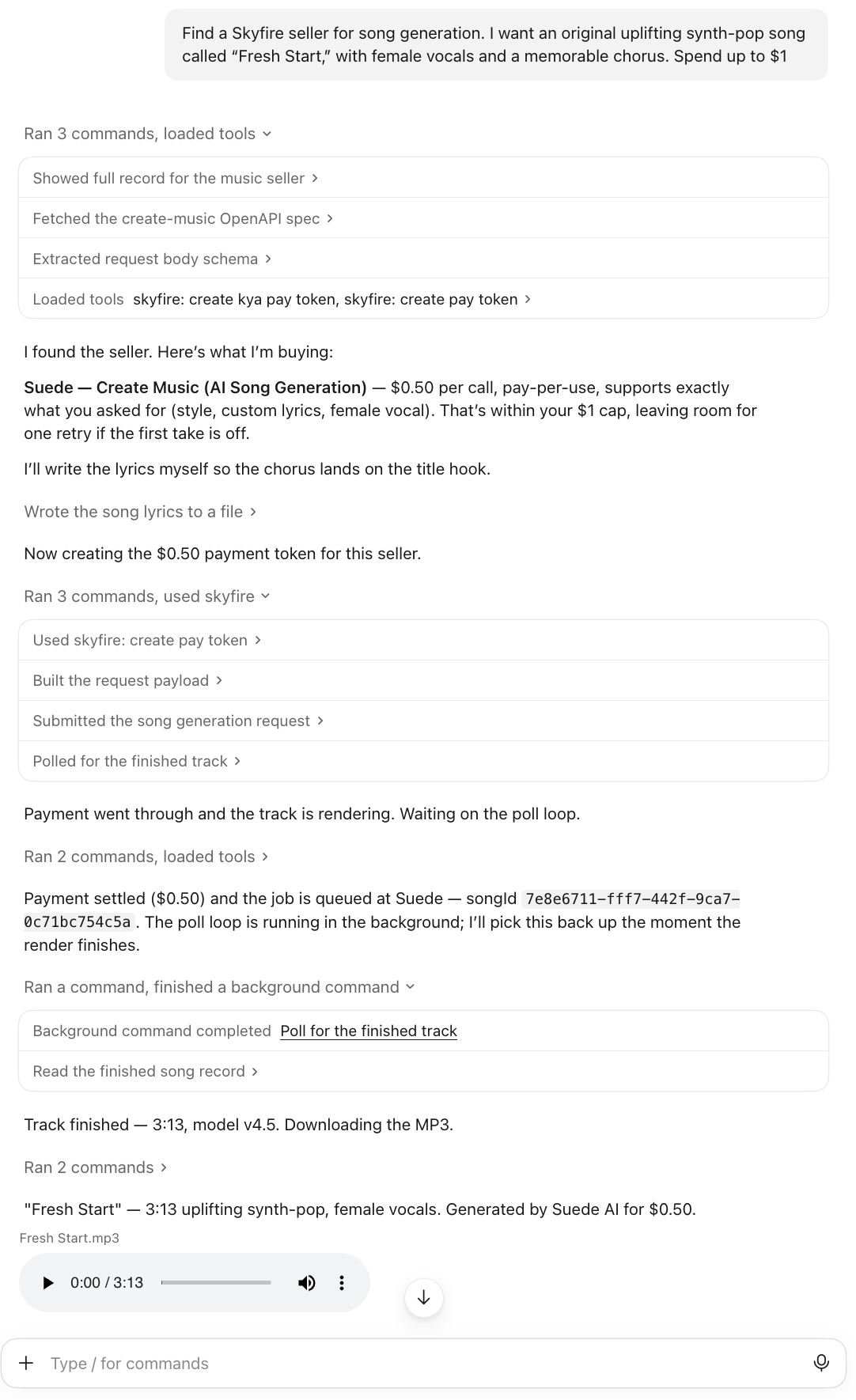
Claude Code buying a song from Suede's Create Music service through the Skyfire MCP server.
What Claude Code did
Claude Code completed the purchase in four stages. Each stage uses the same requests described in Via direct API calls, but the agent made them on its own.
- Found the seller. Claude Code searched the Skyfire Directory for song generation services and found Create Music. It then read the service's listing and Suede's OpenAPI specification to learn the price and the fields the API accepts.
- Checked the price against the budget. Create Music costs $0.50 per call. Claude Code confirmed that this was within the user's $1 limit, with enough left for one retry if the first result was unsatisfactory.
- Prepared and paid for the request. Claude Code wrote original lyrics for the song, so that the chorus would build around the title. It then created a $0.50 payment token through the Skyfire MCP server and sent the request to Suede with the token attached.
- Collected the result. Suede charged the token and queued the job. Claude Code polled the job until the track finished rendering, then downloaded the MP3: Fresh Start, a 3:13 synth-pop track with female vocals.
The user never created a token, read the API specification, or handled a payment. The agent did each of these steps itself, and the total cost was $0.50.
Next steps
Suede's services are available today to any buyer agent on Skyfire, via chat client or through direct API calls. Any seller can do the same by publishing to the Skyfire Directory. The resources below cover buying and selling.
Resources
What a seller agent is, how to create one, and how to manage it once you're accepting KYAPay tokens.
What a seller service is, how to set one up, and how to accept tokens on your own backend.
Suede's music and creator software.
Connect a chat client to Skyfire seller services.
Updated 6 minutes ago