

Originate Tokens
Offer agentic identity and wallets to your customers, with every token they create naming you as its originator.
As a service provider, you can act as an originator: you facilitate token creation for your customers' agents. When you originate tokens:
- You provide agentic identity and agentic wallets to your customers, and are responsible for KYB of each one.
- Skyfire issues their
kya,pay, andkya-paytokens, and hosts the identity and wallet infrastructure behind them. - Every token they create records your URL in its
oriclaim, naming you as its originator.
How origination works
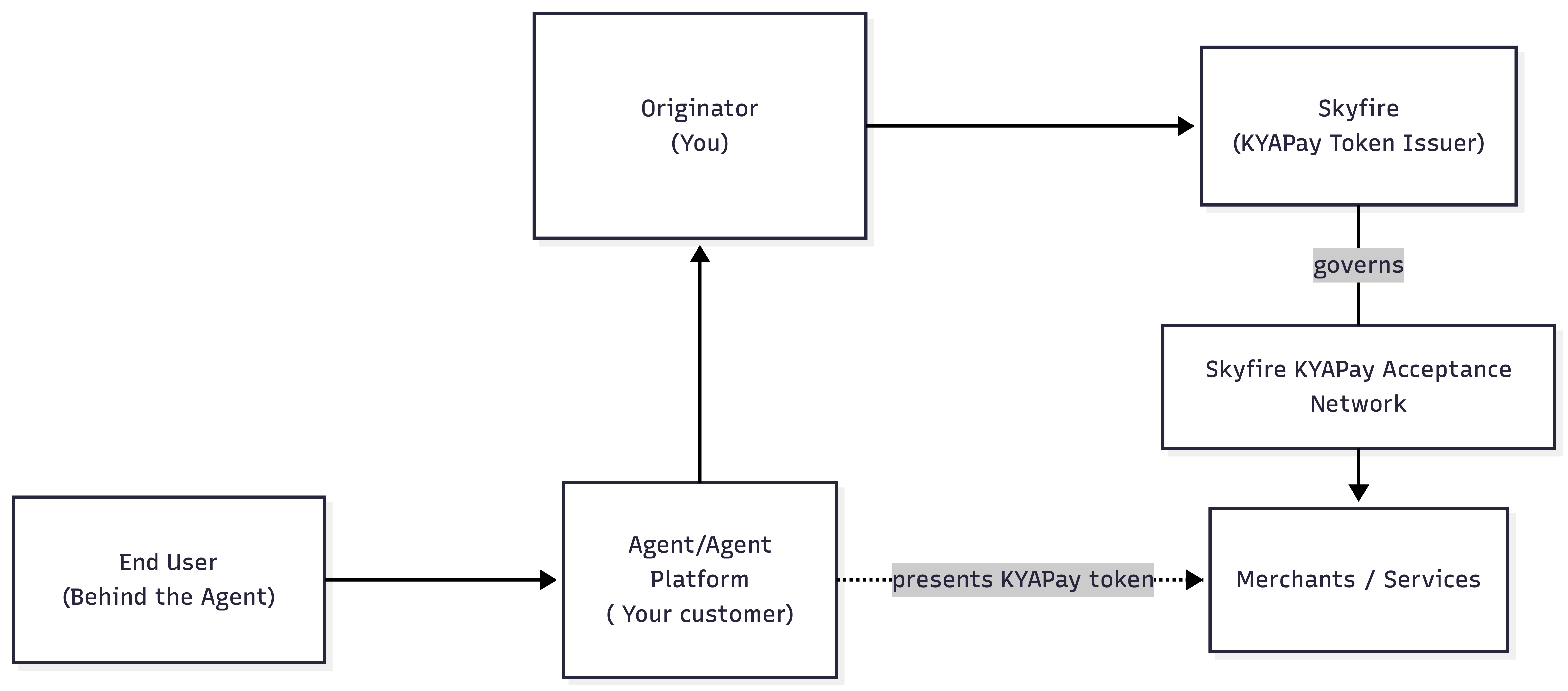
Origination involves several parties, from the person an agent acts for to the merchant or service that accepts its token:
| Role | Description |
|---|---|
| End user | The person on whose behalf an agent acts, the human principal. |
| Agent platform (your customer) | Runs the agents, which act on behalf of the end user and present tokens to merchants or services. Owns the relationship with its end users, and is responsible for KYC of its end users. |
| Originator (you) | Provides agentic identity and agentic wallets to its customers. Responsible for KYB of its customers. |
| Skyfire | Issues the tokens and hosts the identity and wallet infrastructure behind them. |
| Skyfire's KYAPay Acceptance Network | A network of security vendors that merchants use to help secure their websites and APIs, including bot managers, fraud managers, account takeover protectors, and CIAMs. |
| Merchant / service | Accepts tokens from agents to grant access, complete a purchase, or both. |
Skyfire has partnerships with a large and growing list of security vendors that natively accept
kya/kya-paytokens. If you are a security vendor who wants to enable agentic access and payments for your merchants and services, see kyapay.org for more information and reach out to [email protected].
The ori claim
ori claimThe ori claim tells a merchant or service which service provider stands behind a token. It carries the originator's URL. Once you're configured as an originator, it appears in every token your customers create, with no action required from you.
Here's a partial token created by one of your customers:
{
  ...
  "ori": "https://serviceprovider.example",
  "iss": "https://app.skyfire.xyz",
  "hid": {
    "email": "[email protected]",
    "verifier": "https://app.skyfire.xyz",
    "verified": true
  },
  "apd": {
    "id": "098b8552-1e10-43cc-a989-7a71623ac5d3",
    "name": "ACME Shopping",
    "email": "[email protected]",
    "verifier": "https://app.skyfire.xyz",
    "verified": true
  },
  ...
}
The token names three different parties, each in its own claim:
orinames you, the originator.apdnames your customer, the agent platform whose agent created the token.verifier, insidehidandapd, names whoever verified each identity. Here, that's Skyfire.
iss always names Skyfire, which signs every token.
Originating card-backed
payandkya-paytokens is fully supported. Creating one uses Skyfire's Payments React SDK alongside Create Token, rather than an API call on its own. See Agentic Commerce with Payment Cards for how that works.
Next steps
- For how to onboard your customers as organizations, see Set up your customers in the Service Provider Guide.
- For how each organization is structured, see the Organization Guide.
- For card-backed tokens, see Agentic Commerce with Payment Cards.
Updated 20 days ago