

KYA-based access control using Cloudflare
Add KYA token enforcement to a site or API you already serve through Cloudflare, using a Worker and optional WAF rules.
This guide is for teams already running on Cloudflare who want to add Skyfire token-based access control to their existing delivery stack using Cloudflare Workers. A Worker validates the incoming kya token on each request and blocks traffic that doesn't present a valid one.
Before you start: you'll need a Cloudflare account with Workers enabled, and your site or API already served through Cloudflare. The reference implementation for everything below lives in the skyfire-solutions-cloudflare-news-crawler-demo repo.
Choose your path
Two questions decide how you set this up:
CDN if you serve a website through Cloudflare's CDN. API Gateway if you manage APIs through Cloudflare's Endpoint Management.
Automated requests only to let human traffic through and enforce tokens on bots. All requests to require a valid token from every caller.
Follow the section for your Cloudflare product below, then pick an enforcement mode in the tabs.
Cloudflare CDN
Use this if your website is served through Cloudflare's CDN.
Set up the Worker
- Create a Worker, then update the Worker code in
src/index.tsbased on how much you want to gate-keep. - Install the required packages:
npm install validator jose @cloudflare/workers-types - Edit
wrangler.jsoncand set the environment variables undervars:"vars": { "BACKEND_API_URL": "https://api.skyfire.xyz", "OFFICIAL_SKYFIRE_JWT_ALGORITHM": "ES256", "OFFICIAL_SKYFIRE_JWT_ISSUER": "https://app.skyfire.xyz" } - Deploy to Cloudflare.
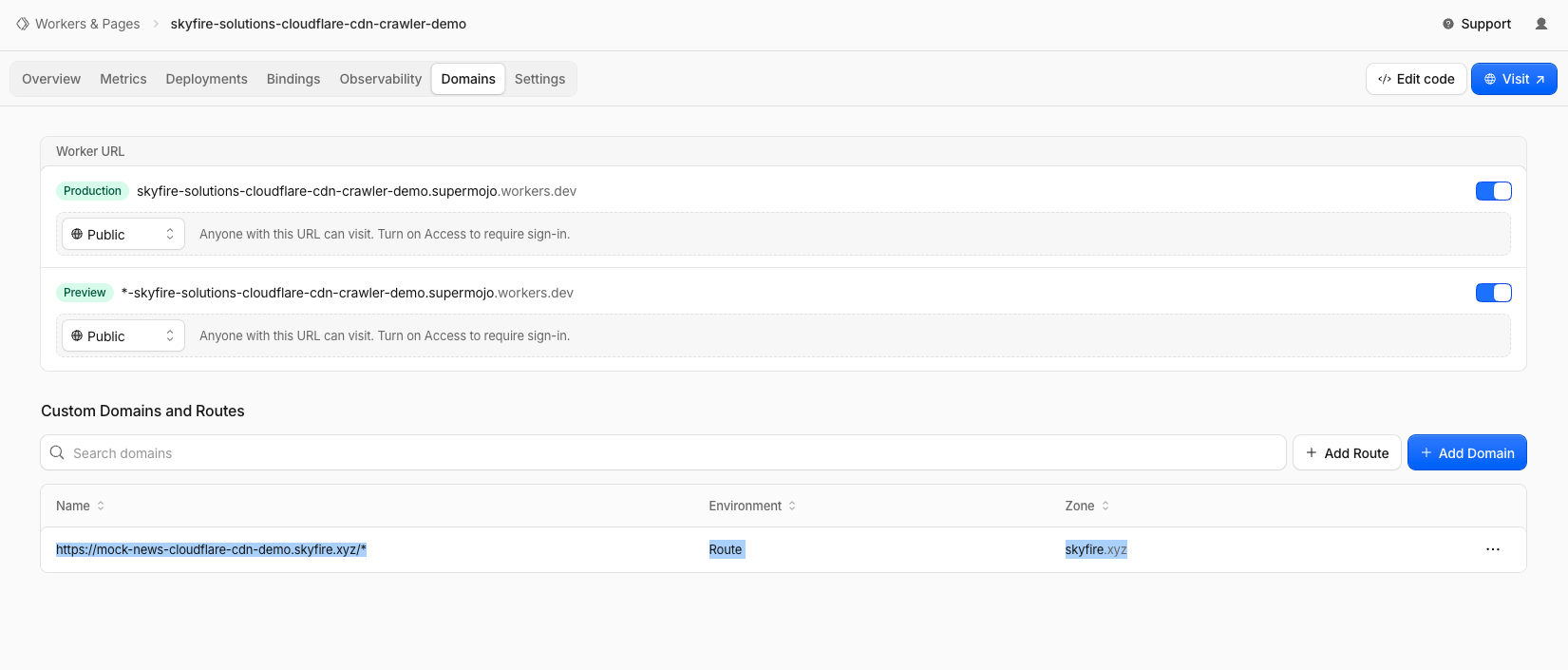
- Add a route to your Worker: open it in the Cloudflare Dashboard, go to Domains, and add a route to your CDN-hosted website under Custom Domains & Routes.
Choose what to enforce
Use a Cloudflare WAF rule to enforce tokens on bot-like traffic while letting humans through.
- Update the Worker code with token validation logic and deploy.
- In the Cloudflare Dashboard, go to Security → Security rules.
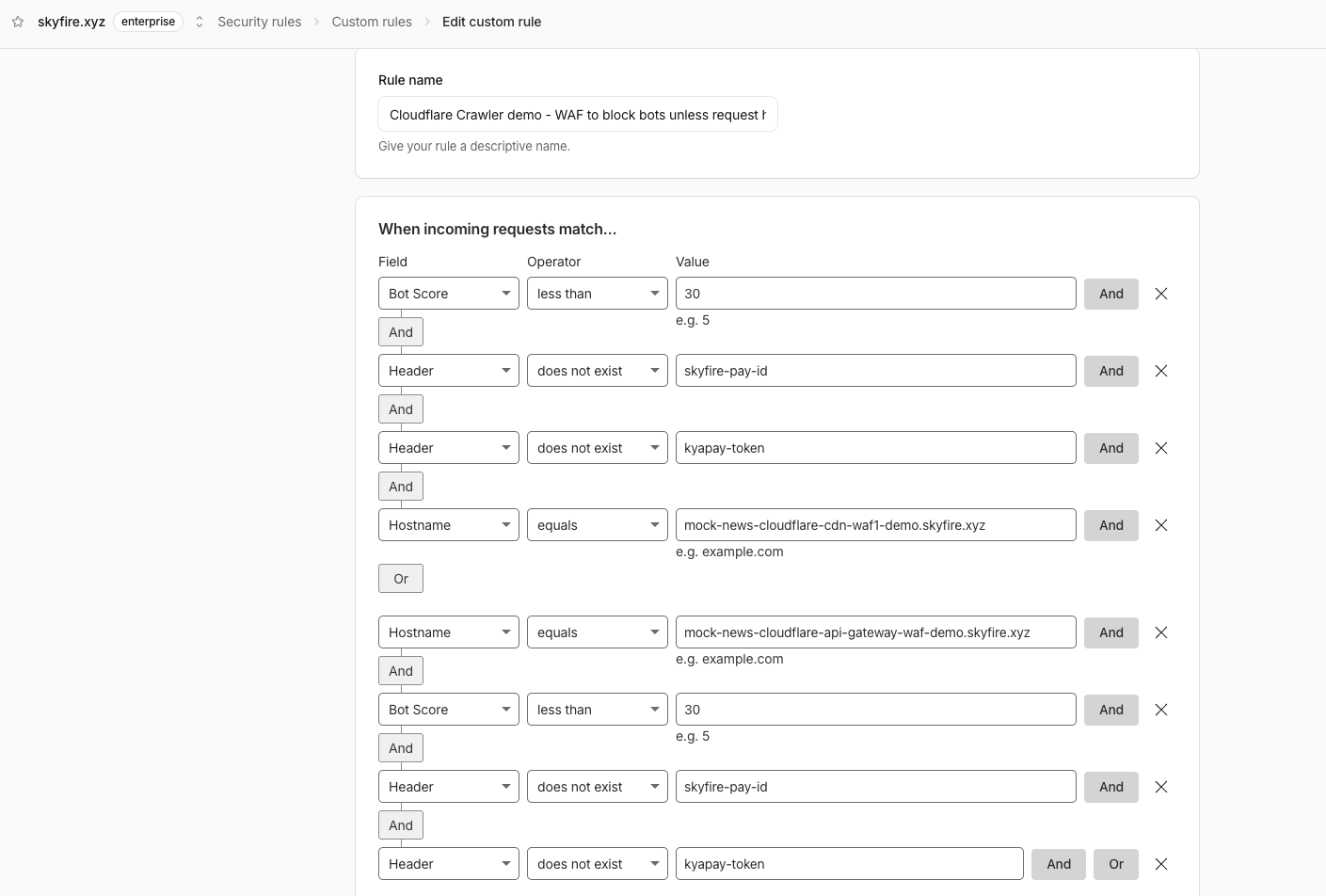
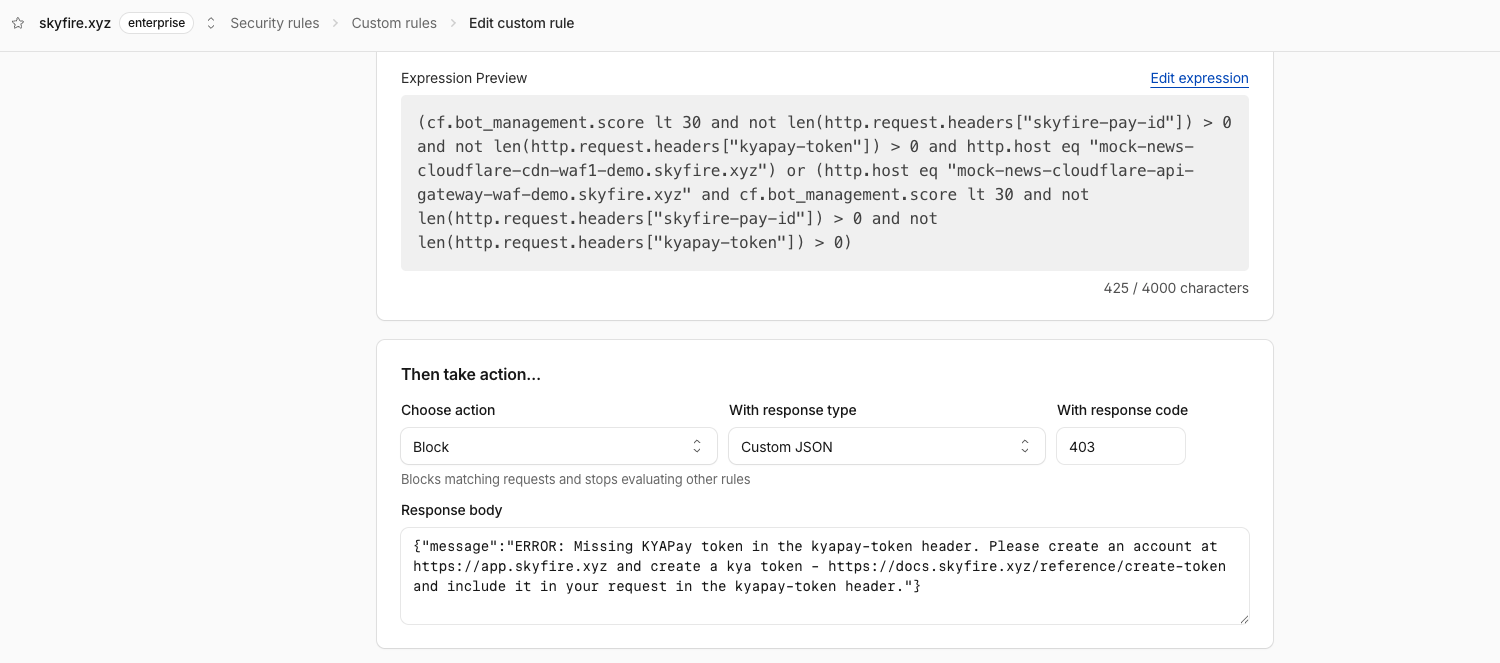
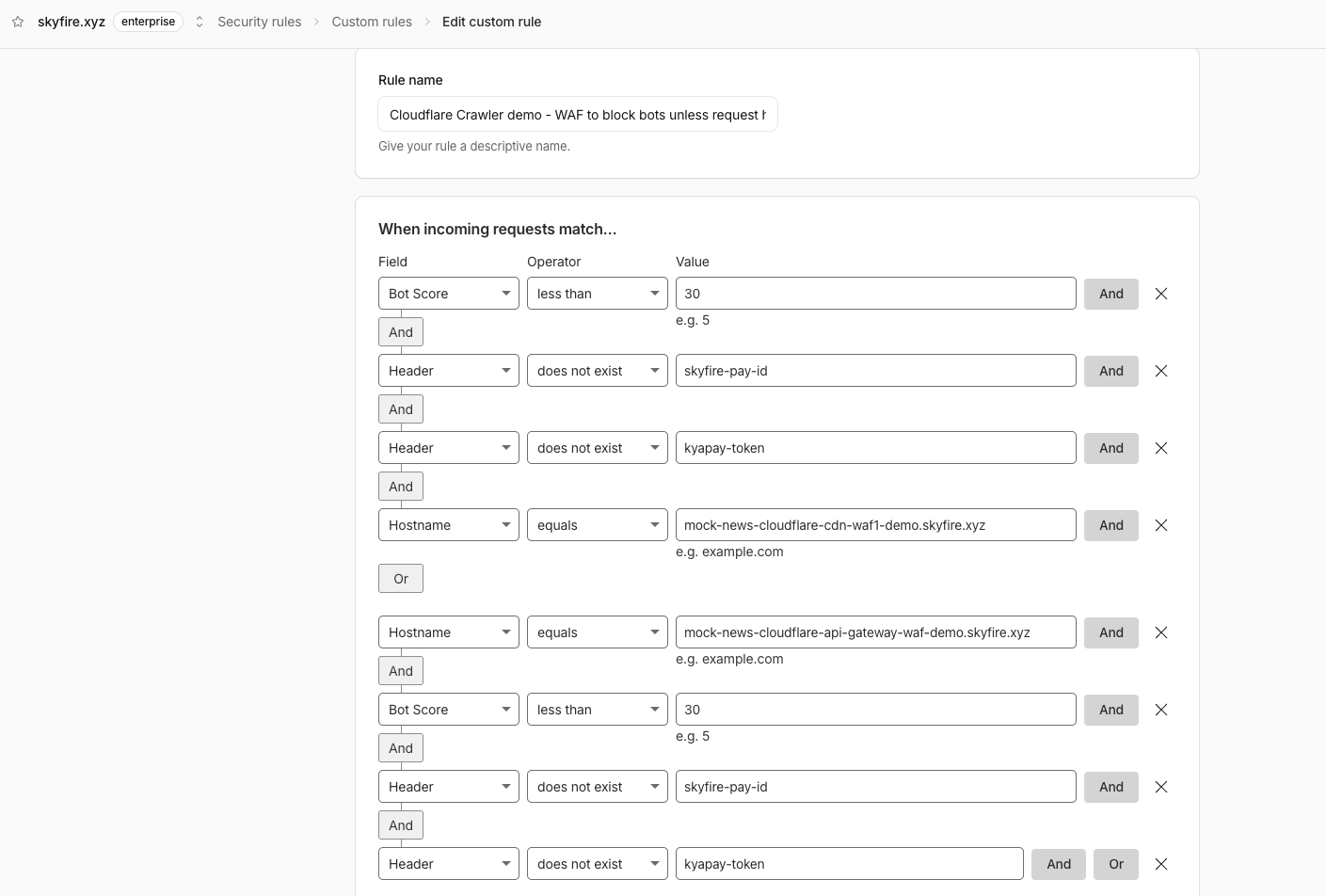
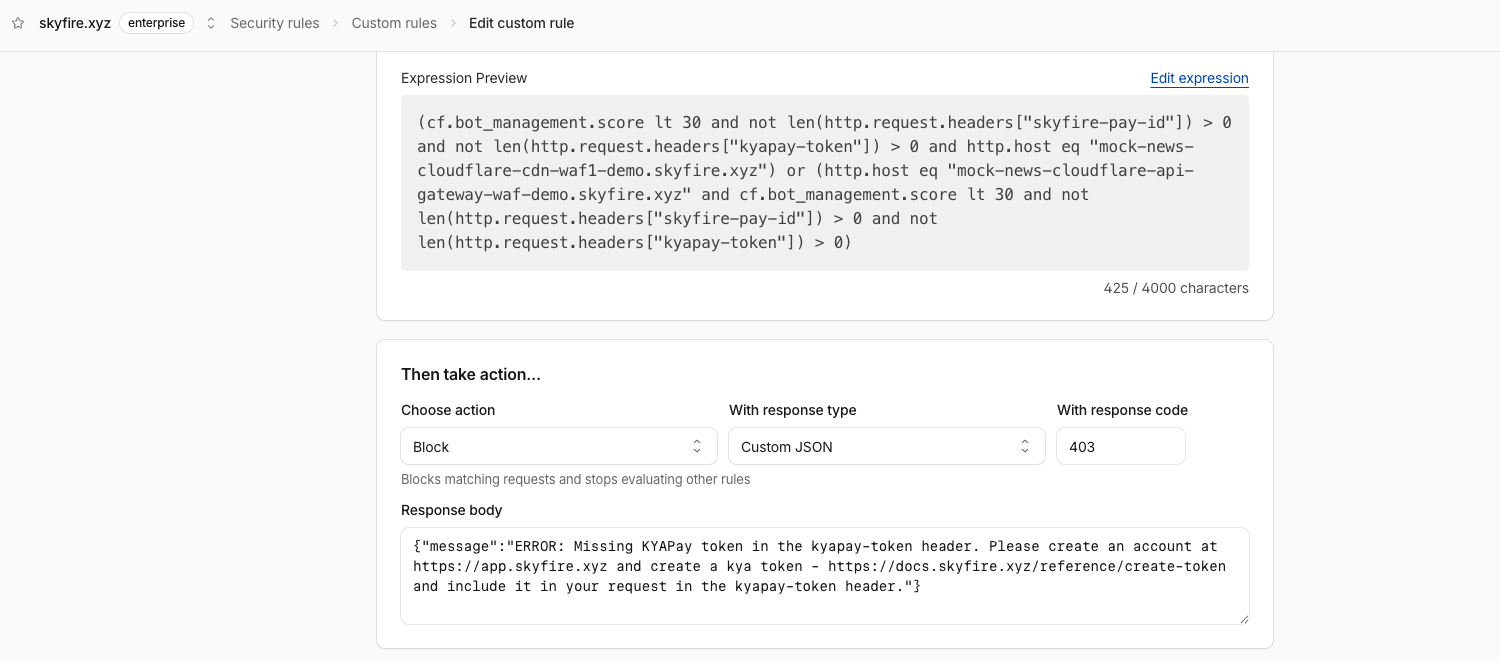
- Create a custom rule that checks for bot-likeliness plus the presence of a
kyapay-token(and deprecatedskyfire-pay-id) header, and blocks the request on this hostname otherwise.
Example rule from our live demo:
Cloudflare API Gateway
Use this if you manage your APIs through Cloudflare's Endpoint Management.
Set up the Worker and Gateway
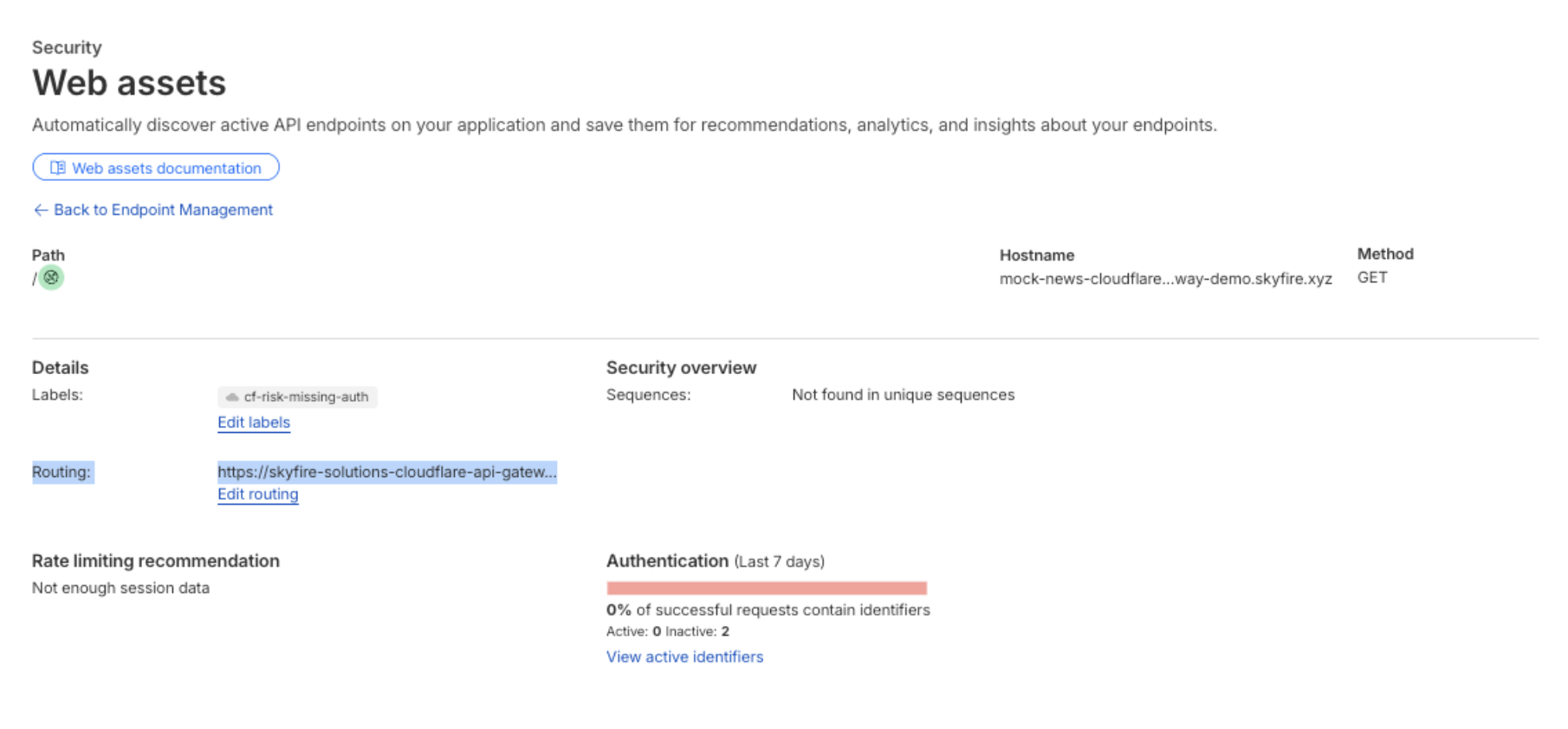
- Create an API Gateway: in the Cloudflare Dashboard, select your account and domain, go to Security → Web Assets, then define a new endpoint under Endpoint Management.
- Create a Worker and update the code in
src/index.tsbased on how much you want to gate-keep. - Install the required packages:
npm install validator jose @cloudflare/workers-types - Edit
wrangler.jsoncand set the environment variables undervars:"vars": { "BACKEND_API_URL": "https://api.skyfire.xyz", "OFFICIAL_SKYFIRE_JWT_ALGORITHM": "ES256", "OFFICIAL_SKYFIRE_JWT_ISSUER": "https://app.skyfire.xyz", "ORIGIN_WEBSITE": "<YOUR_ORIGIN_WEBSITE_URL>" } - Deploy to Cloudflare.
- Associate the Worker with your API Gateway: expand the endpoint's details, go to Routing → Create route, enter your deployed Worker's target URL (for example
your-worker.your-subdomain.workers.dev), and select Deploy route.
Choose what to enforce
Use a Cloudflare WAF rule to enforce tokens on bot-like traffic while letting humans through.
- Update the Worker code with token validation logic.
- In the Cloudflare Dashboard, go to Security → Security rules.
- Create a custom rule that checks for bot-likeliness plus the presence of a
kyapay-token(and deprecatedskyfire-pay-id) header, and blocks the request on this hostname otherwise.
Example rule from our live demo:
What to return when blocking a request
When your Worker blocks a request, return a clear error that tells the caller how to get a token. Use these responses:
| Reason | Status | Response body |
|---|---|---|
| Missing token | 403 | Error: Missing KYAPay token in the kyapay-token header. Please create an account at https://app.skyfire.xyz and create a kya token (https://docs.skyfire.xyz/reference/create-token) and include it in your request in the kyapay-token header. |
| Invalid token | 401 | Error: Invalid KYAPay token in the kyapay-token header. Please create an account at https://app.skyfire.xyz and create a kya token (https://docs.skyfire.xyz/reference/create-token) and include it in your request in the kyapay-token header. |
For the full set of recommended responses, see Handling Missing or Invalid Tokens.
Demo
References
Updated about 7 hours ago